Components
The brawn behind Dell’s XPS 710 is Intel’s quad-core Core 2 Extreme QX6700 processor. At the time of this article’s writing, this is the only CPU that this system is available with. The Core 2 Extreme QX6700 is Intel’s first quad-core CPU, it runs at 2.66GHz and contains an 8MB L2 cache with a 1066MHz FSB.
Technically, there’s nothing stopping Dell from supporting slower Core 2 CPUs with the XPS 710, but for now Dell’s leaving quad-core exclusively to the XPS 710.
The XPS 710 can be ordered with a variety of graphics cards however. Not only does the XPS 710 support NVIDIA’s GeForce 7950 GX2, it also can be ordered with the GeForce 7900 GS 256MB, GeForce 7900 GTX, and Radeon X1950 XTX cards. All of these cards can be ordered with a single graphics card, or dual graphics cards. In the case of the GeForce 7950 GX2, this adds up to NVIDIA’s Quad SLI. Dell even supports hardware-based CrossFire for ATI’s Radeon X1950 XTX. This is the only NVIDIA nForce-based system we’re aware of that supports ATI’s CrossFire technology, normally you must have a CrossFire-compliant motherboard for this.
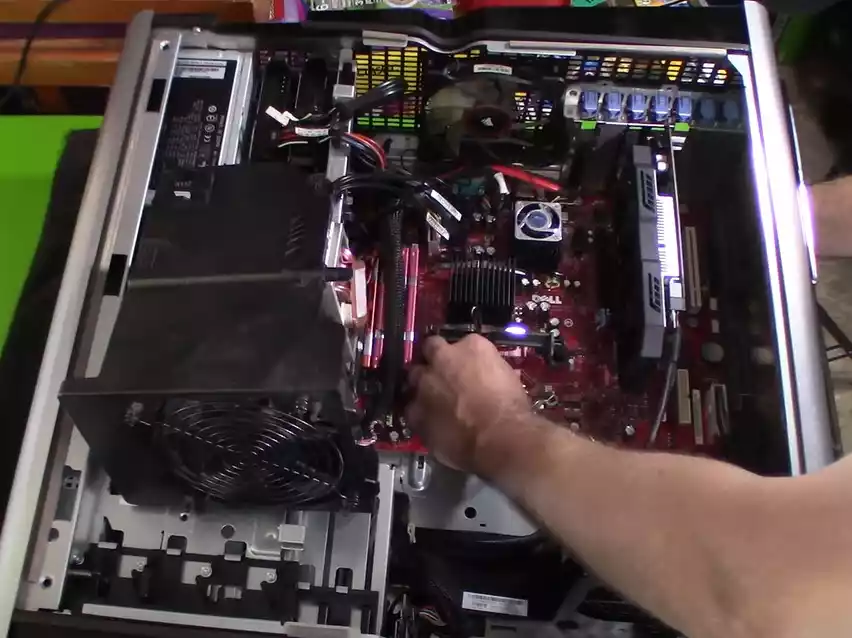
The system can also be ordered with a plethora of memory and display configurations (four DIMMs are in place on the motherbard), as well as offering two power supplies, a 750-watt unit and 1,000 watt PSU.
Our system was outfitted with the 1,000 watt PSU and it’s certainly an impressive unit: the PSU ships with four PCI Express power connectors for graphics cards. As a result, this is one of the few PSUs on the market that should have no problems working with dual GeForce 8800 GTX cards running in SLI mode (one of NVIDIA’s requirements for GeForce 8800 GTX SLI operation is that the PSU has all four power connectors built-in, using the PCIe power adapters that are so popular nowadays can lead to stability issues when the cards are under load in SLI). The PSU is also designed to deliver high power on the 12V rails, which are used predominantly by the CPU and GPU nowadays, according to the PSU’s specs up to 950W are available on the 12V rails, and 150W on the 3.3V and 5V rails.
Because of all this, we have no doubt that the XPS 710 is up to the task of powering NVIDIA’s GeForce 8800 GTX, including two of the cards in SLI mode. We’ve been told by Dell that they’re currently qualifying the 8800 cards for use with the XPS 710 and that they will begin offering the cards before the end of the year. They wanted to make sure that both the graphics card and driver were fully qualified before shipping to customers. Considering how early the current 8800 driver in particular is, this makes a lot of sense, if you recall some of the pre-release 8800 drivers had issues with HDR+AA in some games like Oblivion, as well as lacking support for SLI, so it’s good to see that Dell is taking their time with the process and making sure everything is in place and up and running smoothly before offering the cards for sale as an option to customers.
Sitting underneath the graphics cards lies a Creative Sound Blaster X-Fi XtremeMusic sound card. A lot has been made about the X-Fi cards Dell uses and whether or not they support Dolby Digital 5.1 and DTS. The answer is that the XPS 710 does support DD 5.1, but doesn’t support DTS.
It turns out that Dell uses the exact same sound cards Creative uses on their retail cards, only Dell doesn’t install the software codec for DTS playback. In order to hear DTS-encoded content in their full glory, you’ll have to install a DVD player that supports DTS. This is something you’ll want to keep in mind if DTS support is important to you.
Dell doesn’t support DTS playback at this time because their Sonic CinePlayer application lacks support for DTS, and they can’t use Creative’s retail software package because of compatibility issues they’ve discovered between the Creative software and CinePlayer.
One component we were a little disappointed with Dell however were the memory modules Dell uses on the XPS 710. Not only are they 667MHz DDR2 modules, they’re basic 5-5-5-12 modules manufactured by Nanya. Basically, the modules are very vanilla, there’s nothing exotic or high-end about them. We’d like to see Dell incorporate higher-end modules with faster speeds and tighter memory timings for use on a high-end system like the XPS 710, the modules even lack heat spreaders.
Overclocking
One cool feature Dell includes in the XPS 710’s BIOS is the ability to overclock the CPU. The method Dell employs is CPU multiplier adjustment: multiplier options of 11.0 and 12.0 are provided in BIOS, providing CPU overclocks of 2.93GHz and 3.2GHz with just a few keystrokes.
Since multiplier adjustment is the only form of overclocking supported, the rest of the system components, including the motherboard, chipset, and graphics are all kept at their stock speeds, the only component that’s being overclocked is the CPU. And since Dell has done such a remarkable job of keeping the CPU cool, the Core 2 QX6700 can be overclocked fairly easily – we ran our system overclocked to 3.2GHz for approximately 24 hours running looped runs of 3DMark with no problems.

I am Chris, a musician. I work as an audio engineer in mastering and arranging bridges in existing songs and the arrangement and orchestration of chorus. In Firing Squad I test gear provided by local distributors during a couple of days and write a review. I also write about AV topics, amplifiers, speakers and headphones.
Author And Fact Check
Written by author J. Bond and fact checked by Martin Pino and J. Esposito to ensure that the data retrieved is objectively correct